
AI Operator Sourcing with Tactical Arbitrage

Aug 31 / Layla Gomes & Sabrina Horton
Loading the Elevenlabs Text to Speech AudioNative Player...
Sourcing profitable products can take hours. This isn't because every decision is difficult, but because the workflow includes so many repetitive steps.

You build searches, adjust filters, review results, compare listings, check product matches, and decide which opportunities deserve a closer look. The work adds up quickly, especially when you are still learning what a strong lead looks like.

AI Operator
helps reduce that workload. Instead of only answering questions, it can perform supported tasks inside connected Seller 365 tools using plain-English instructions. With Tactical Arbitrage, that means you can describe the sourcing job you want completed, ask Operator to help review the results, and use its matching agent to check potential product mismatches.

In this guide, you will learn how to use AI Operator alongside Tactical Arbitrage to:

  • Build more focused sourcing searches
  • Write clearer, reusable prompts
  • Prioritize results for manual review
  • Keep the final buying decision in your hands
  • Verify retail-to-Amazon product matches
  • Turn successful searches into repeatable sourcing workflows

What Is AI Operator?

AI Operator is an AI agent built for Amazon sellers that connects with Seller 365 tools, including Tactical Arbitrage. From a chat-style interface, it can carry out supported tasks based on your instructions.

Unlike a general chatbot that only explains what to do, AI Operator can work inside connected tools to help complete supported sourcing tasks.

For Tactical Arbitrage users, think of AI Operator as a sourcing assistant that can help with three time-consuming jobs:
1
Search setup
Turn your sourcing criteria into a Tactical Arbitrage search.
2
Result prioritization
Help surface products that deserve review first.
3
Match verification
Compare retail products with Amazon listings and identify likely mismatches.
AI Operator does not replace Tactical Arbitrage, and it does not replace seller judgment. Tactical Arbitrage finds and analyzes opportunities. Operator reduces the repetitive work around that process.

What Can AI Operator Help You Do in Tactical Arbitrage?

Tactical Arbitrage supports several sourcing workflows. You do not need to master all of them at once, but understanding their purpose helps you give AI Operator a clearer assignment.
Workflow
Best used for
Finding online arbitrage opportunities from retail websites
Reviewing ready-to-explore sourcing collections and opportunities
Starting with ASINs or product identifiers and finding stores that carry them
Comparing supplier lists with Amazon listings
Confirming whether an account may be eligible to sell an ASIN
For beginners, a simple Product Search is a good starting point because it creates a clear beginning-to-end workflow: define the opportunity, run the search, review the leads, verify the matches, and decide what deserves a test buy.

Before You Begin: Give Operator the Right Inputs

The quality of an AI-assisted sourcing workflow depends on the quality of the instructions and data behind it. Before submitting a task, decide what a useful result looks like.

Include the criteria that matter to your business, such as:

  • Source retailer or website
  • Minimum return on investment (ROI)
  • Minimum or maximum seller count
  • Amazon marketplace
  • Minimum estimated profit
  • If Amazon should be excluded as a seller
  • Product category
  • Maximum sales rank
  • ASIN list, supplier file, or source page 
Be especially clear about the marketplace. According to the current AI Operator best-practices guide, AI Operator defaults to the U.S. marketplace when none is specified. Naming the correct marketplace helps prevent empty or unexpected results.

Step 1: Build a Focused Product Search

Instead of opening every search setting and configuring it manually, describe the sourcing outcome you want in one complete message.

For Example:

Quick Picks Prompt
“Show me instant leads from Quick Picks for toys 80k sales rank max with at least $5 profit and 35% ROI.”

This prompt works because it identifies:

  • Workflow — Quick Picks
  • Category — Toys
  • Maximum sales rank — 80,000
  • Minimum profit — $5
  • Minimum ROI — 35%.
If you are new to Tactical Arbitrage, start with a small, focused search. A narrower search is easier to review and troubleshoot than a request that scans an entire retailer or catalog at once.
Why this matters

Natural-language setup makes it easier to test different sourcing strategies without worrying that you have forgotten an important filter. It also helps you turn a successful search into a repeatable process.

When a prompt produces useful results, save it. Later, you can change the search type, category, ROI, or profit target without rebuilding your method from scratch.

Step 2: Ask AI Operator to Prioritize the Results

A completed search may return more leads than you can review immediately. This is where AI-assisted prioritization can reduce decision fatigue.

Try something like:

Prioritization Prompt
“Review this batch and create a shortlist of the products worth checking first. Prioritize stronger estimated margins, lower competition, and cleaner-looking matches. Return the shortlist as a table with the reason each product was selected.”
Operator can help surface:
  • Stronger margin opportunities
  • Cleaner-looking product matches
  • Lower-competition listings
  • Products that deserve manual review first
With prompts, it's important to pay attention to the wording. AI Operator is prioritizing leads, not making the final purchase decision. ROI, profit, rank, and seller count are useful signals, but they do not show every risk.

Before buying inventory, confirm the live source price, discounts, shipping costs, taxes, fees, stock availability, listing condition, and any restrictions that apply to your account.

Step 3: Verify the Product Matches

One of the most expensive online arbitrage mistakes is buying a retail product that does not match the Amazon listing.

The packaging may look almost identical while the actual product differs by:
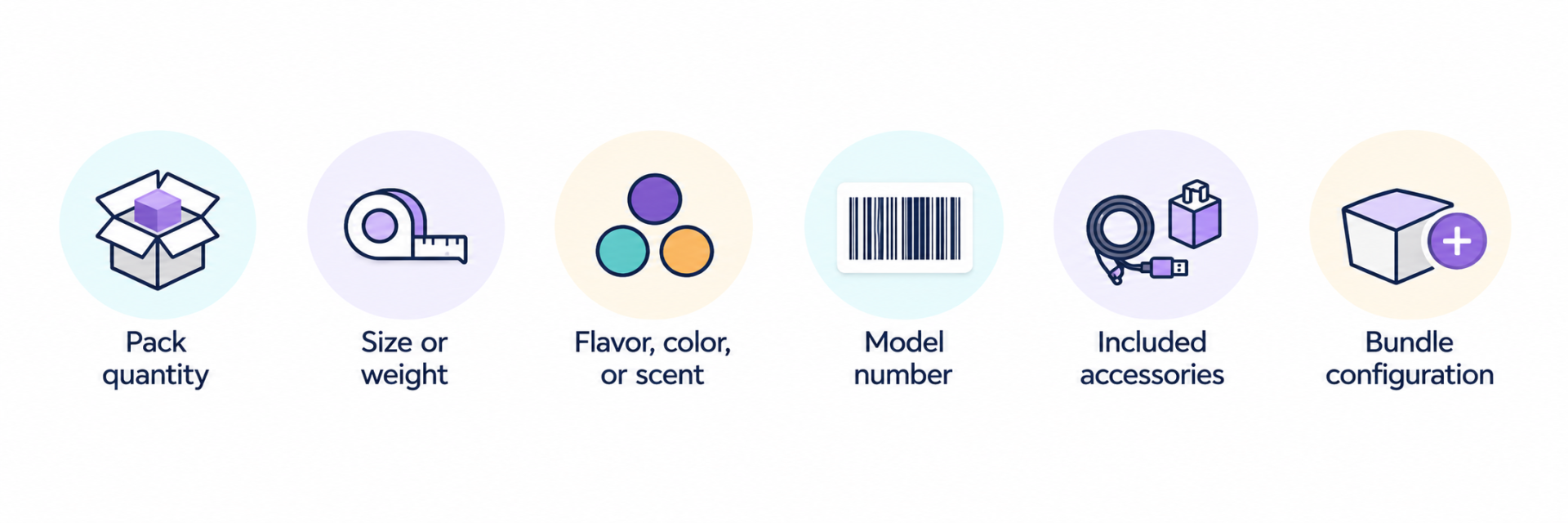
AI Operator includes a matching agent that can compare search results with Amazon listings and flag products that do not appear to line up.

Try this prompt:

Match Verification Prompt
“Verify the shortlisted results against their Amazon listings. Separate the likely matches from the questionable matches, and explain any pack-size, variation, model, or bundle concerns. Then, run a restriction checker on them.”
This creates a more useful review queue than simply asking Operator to “remove bad matches.” A flagged result gives you the opportunity to inspect the evidence before deciding whether to reject the lead.

Matching technology reduces manual work, but it should not be treated as a guarantee. The official best-practices guidance also notes that live prices and promotions can lag, so confirm the current retail price before committing to a purchase.

Step 4: Make the Final Sourcing Decision

After the results have been prioritized and checked for likely mismatches, review the best candidates yourself.

For each potential test buy, confirm:

AI Operator helps you reach this decision point faster. You still decide whether the evidence is strong enough to spend money.

A Complete Start-to-Finish Prompt Sequence

The easiest way to understand AI-powered sourcing is to follow one complete job rather than jumping between unrelated features.
Start-to-Finish Prompt Sequence

AI Operator + Tactical Arbitrage Sourcing Workflow

1
Create the search

“Show me instant leads from Quick Picks for toys 80k max sales rank with at least $5 profit and 35% ROI.”

2
Prioritize the output

“Review this result batch and shortlist the ten products worth checking first. Favor stronger margins, lower competition, and cleaner-looking matches. Explain each choice in a table.”

3
Verify the matches

“Verify those ten products against the Amazon listings. Separate likely matches from questionable ones and explain any size, pack, variation, bundle, or model concerns. Then, run a restriction checker on them.”

4
Prepare the review file

“Export the verified shortlist with source price, Amazon price, estimated profit, ROI, seller count, sales rank, match status, and review notes.”

5
Complete the manual review

“Open the export, confirm the live data, check restrictions, and decide which products—if any—deserve a small test buy.”

This workflow gives you a clear sourcing story: search, shortlist, verify, export, and decide.

Key Takeaways

  • AI Operator performs supported tasks inside connected Seller 365 tools, making it more than a general sourcing chatbot.
  • Smaller, focused jobs are easier to complete and validate than broad requests.
  • With Tactical Arbitrage, it can help build searches, prioritize results, and verify product matches.
  • Matching and prioritization save time, but live data and final buying decisions still require seller review.
  • Clear prompts should include the source, marketplace, workflow, and every filter that matters.
  • Save effective prompts so successful searches can become repeatable sourcing workflows.

Ready to Put AI Operator
to Work?

Start your next sourcing workflow today and see how AI Operator can help streamline this process!
UniCon

Got questions
about UniCon?