
Amazon Ungating Denied? Use AI to Review and Resubmit
Your Amazon ungating application was denied. You have an invoice, product photos, maybe delivery records, and a message from Amazon that does not exactly spell out what went wrong.
Already Denied
Applying For The First Time
Managing Multiple Applications
Amazon’s current invoice guidance for appeals says submitted invoices must be authentic and unaltered and identifies digitally manipulated documents as unacceptable.
If the invoice itself is wrong, the fix needs to come from the source, such as requesting a legitimate correction from the supplier.
Run the audit before you submit. Catching a mismatched address or unreadable photo now is much easier than diagnosing it after a denial.
Turn the audit into a repeatable checklist. AI can help you organize identifiers, documents, and application notes without treating every approval request like a brand-new scavenger hunt.
What AI Can And Cannot Do For Amazon Ungating
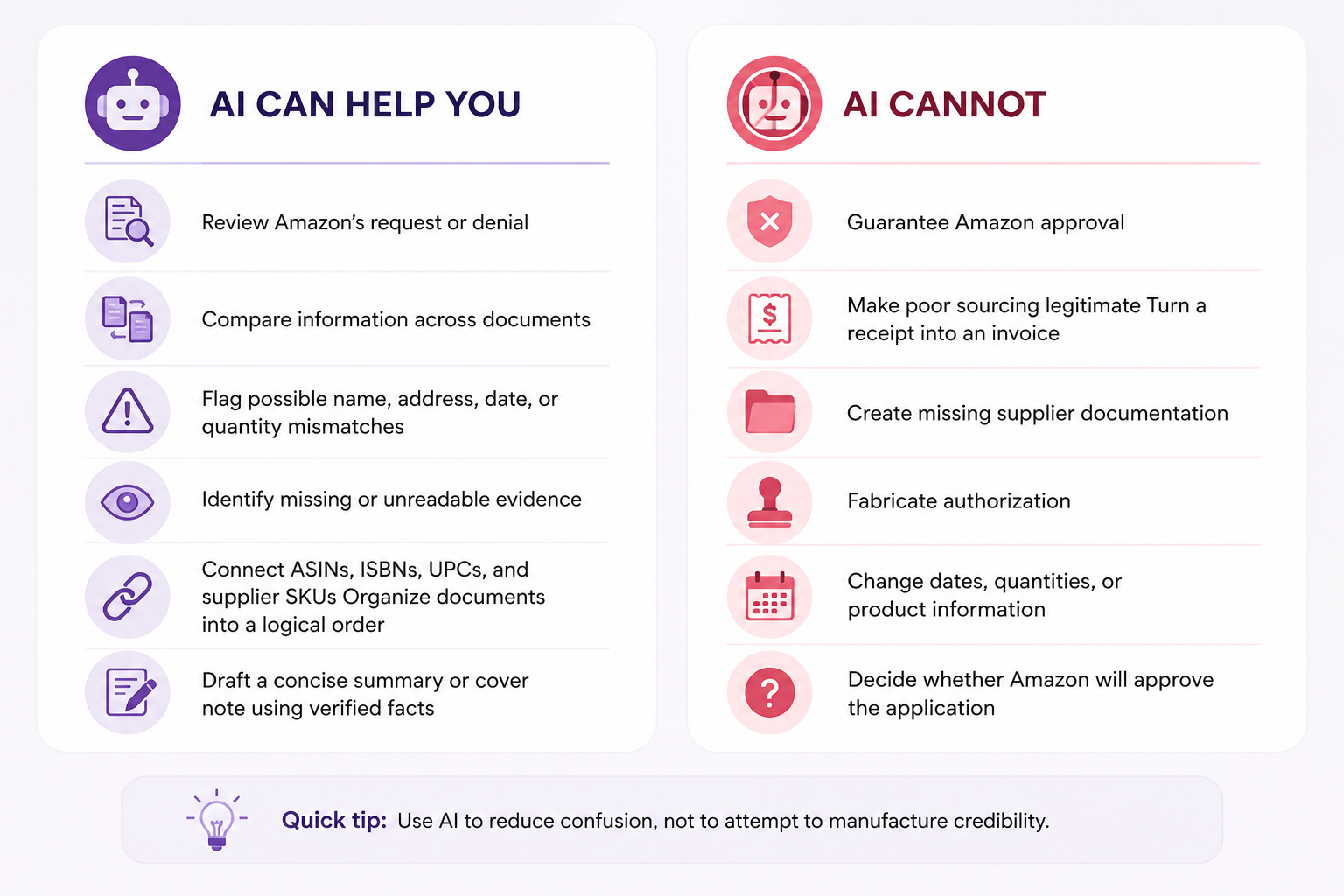
Before AI, Gather What Amazon Actually Asked For
Do the boring part first. It matters.
Open the approval request or denial in Seller Central and gather the records that relate directly to it.
Depending on Amazon’s request, that might include:
-
The exact approval or denial message
-
Packing slip
-
Original supplier invoice
-
Product and packaging photos
-
Order confirmation
-
Readable UPC photos ASIN, ISBN, UPC, or supplier SKU info
-
Shipping or delivery confirmation
-
Quantities and purchase information
-
Carrier proof of delivery
-
Your seller name and address exactly as shown in Seller Central
Amazon’s current approval guidance specifically tells sellers to review the requirements for their product before applying because restrictions and required documentation can differ.
Protect The Originals
Keep your original source documents unchanged.
If you want an AI tool to review a document, consider making a separate AI-review copy first. Remove information the tool does not need, such as full payment-card numbers, bank information, tax IDs, passwords, unrelated transactions, or customer data.
Then check the current privacy and data-retention settings for whichever AI service you use before uploading business records.
Do not ask AI to “fix” an invoice
Amazon’s current invoice guidance for appeals says submitted invoices must be authentic and unaltered and identifies digitally manipulated documents as unacceptable.
If the invoice itself is wrong, the fix needs to come from the source, such as requesting a legitimate correction from the supplier.
Not Sure Where To Start? Build Your AI Audit Prompt
Not sure where to start? Build your AI audit prompt
Choose where you are in the approval process and what evidence you have. This tool will create a tailored prompt you can copy into ChatGPT, Claude, Gemini, or another AI assistant.
Copy this into your AI assistant
Run An AI Audit Before You Draft Anything
This is where AI starts earning its keep. Your first request should not be “write my Amazon appeal.” First ask it to inspect what you actually have.
Audit my approval documents
I am preparing an Amazon selling-approval request. Review Amazon's exact message and the documents I provide before drafting any response.
Organize your review into four sections:
Check names, addresses, supplier information, dates, order numbers, quantities, product identifiers, ASINs or ISBNs, UPCs, and supplier SKUs where available.
Do not alter, invent, or assume any information. If you cannot verify something from the evidence, label it as uncertain.
The important phrase there is “before drafting anything.” You want the AI looking for problems, not rushing to make everything sound polished. A beautifully written explanation attached to inconsistent evidence is still inconsistent evidence.
Create An Evidence Map
For applications covering several products, ask AI to put the information into a simple table.
Connect each product to its proof
Create a table connecting each requested ASIN or ISBN to the evidence I provided.
Use these columns:
Use only information you can verify from the materials I provided. Do not fill gaps with assumptions or invent connections between products and documents.
If an ASIN, ISBN, UPC, supplier SKU, quantity, or document cannot be confidently connected, clearly label it as uncertain and tell me what I need to verify myself.
The table does not become new evidence. It simply helps you see whether the evidence you already have connects cleanly.
Fix The Real Problem Before You Resubmit
Once AI flags possible weaknesses, your job starts. This section is a good candidate for an accordion because readers can jump directly to the problem they found.
My seller name or address does not match the invoice
Check the originals first. If the invoice contains incorrect information, contact the supplier and ask whether they can issue a legitimate correction.
Do not edit the supplier’s invoice yourself simply to make it match Seller Central.
The ASIN does not clearly match the supplier SKU
Look for genuine identifiers connecting the two products, such as UPC, ISBN, model number, product description, or clear product photography.
If you cannot confidently demonstrate that the invoice line represents the Amazon product, do not ask AI to make that connection for you.
I am missing delivery evidence
Look for the actual carrier record, tracking information, delivery confirmation, or other documentation Amazon requested.
AI can tell you that the evidence is missing. It cannot create valid proof of delivery.
My product or UPC photos are unclear
Retake them. Use clear lighting, show the requested packaging and labels, and keep the photos unedited. Generative AI should not be used to recreate, sharpen into existence, or change details Amazon is asking you to prove.
My supplier cannot provide what Amazon requested
That may be a sourcing problem, not an application-writing problem. Sometimes the most useful result of an AI review is learning that the package is not ready to submit.
If Amazon Already Denied The Application
Save Amazon’s exact response and bring it back into the same review process.
Diagnose the denial
Amazon declined my selling-approval request with the message below. Compare Amazon's exact message with the evidence I submitted.
Separate your response into five sections:
Do not guess why Amazon made the decision, assume the rejection was automated, or recommend changes that are not supported by Amazon's message or my original records.
If the reason for the denial cannot be determined from the information provided, say so clearly and tell me what I need to verify myself.
Amazon's message: [PASTE EXACT RESPONSE]
Build A Clearer Resubmission
A clear package might include:
-
A short factual cover note
-
Order confirmation
-
Seller and order summary
-
Delivery evidence
-
Product-to-supplier identifier map Document index
-
Product and UPC photos
-
Original invoice
-
Any additional documentation specifically requested by Amazon
Draft a factual cover letter
Using only the verified information in my records, draft a concise cover letter for this Amazon selling-approval request.
The cover letter should:
Do not add claims that are not supported by the documents. Do not claim that a supplier, product, transaction, authorization, or document has been verified unless the evidence clearly supports that statement.
Do not invent explanations for missing information. If a fact needs to be confirmed before the note can be accurate, flag it for me instead of guessing.
Then read it yourself. AI is very good at producing sentences that sound certain. That does not make them true.
Frequently Asked Questions
Can ChatGPT, Claude, or Gemini get me ungated on Amazon?
No. They can help review and organize information, but Amazon makes the approval decision based on your account, the product, and the evidence required for that application.
Can I use AI to edit an invoice so it matches Seller Central?
No. If source information is wrong, correct it with the supplier or address the legitimate discrepancy. Do not use generative AI to alter the document.
Should I keep resubmitting if Amazon denies me?
Only when something has meaningfully improved. Compare the denial with your records, correct the actual problem, review Amazon’s current requirements, and then decide whether the package is ready.
Can I use this process before my first ungating application?
What if the AI says my documents look good and Amazon still says no?
AI does not know Amazon’s internal decision-making and cannot predict approval. Treat its review as a second set of eyes, not a verdict.
Final Tip: Use AI To Make The Truth Easier To Follow
A denial is frustrating, but resubmitting the same package without understanding what needs attention rarely teaches you anything.
Still Not Sure What Is Weakening Your Application?
Sometimes you can gather the documents, read the denial five times, run the AI audit, and still be unsure what your next move should be. Talk one-on-one with a Threecolts expert to work through your selling workflow, questions, and next steps. Threecolts University currently offers 1:1 sessions for Seller 365 and individual Threecolts products.
Build a clearer resubmission