AI Operator gives sellers a conversational way to work with supported Seller 365 tools. You can describe what you are trying to do in plain language, ask questions about connected account data, and use supported workflows to analyze information or take next steps.
With AI Operator, you can begin with your goal, provide any details AI Operator asks for, and continue refining the request through the conversation.
In this guide, you'll learn:
What AI Operator is, how it works, and how it differs from a general chatbot
How to start and continue a workflow using natural-language requests
How AI Operator can take on different seller roles across supported Seller 365 tools
What information to include to get more useful results to scale your workflow
What Is AI Operator?
AI Operator is an AI assistant for your Amazon business that has direct access to supported Seller 365 apps. It can answer questions, analyze business data, and take supported actions inside those tools.
When AI Operator is connected to a supported tool, you can communicate with it more like a knowledgeable coworker than a search bar. You do not always need to know a feature name, strategy ID, report name, or internal setting before getting started.
For example, you might ask:
Find products that match my sourcing criteria: $5 profit and no Amazon Sellers
How are my repricing strategies doing?
Create an FBA shipment from my buy list. (Attach buy list)
The exact capabilities available depend on your Seller 365 plan, connected tools, account data, and the workflows currently supported by AI Operator.
Meet Your AI Operator Team
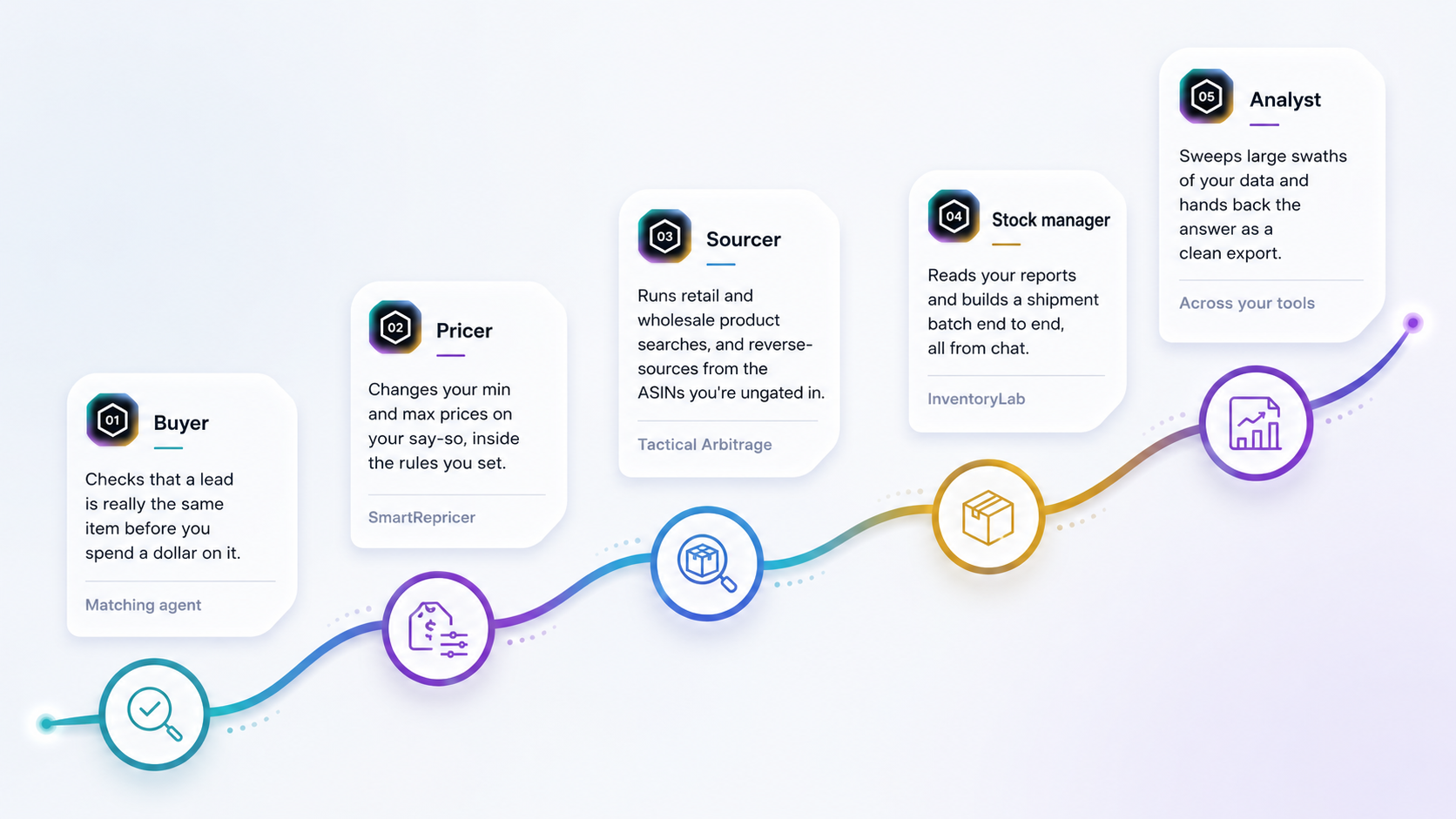
AI Operator is designed to take on the kinds of slow, repetitive jobs you might otherwise hand to an analyst or VA. Depending on what you ask it to do, it can step into different seller roles across your connected Seller 365 tools.
AI Operator can also set alerts for selected listings and reviews and create buyer-feedback or review-request campaigns through FeedbackWhiz.
Prefer to watch? Check out this video for how to get started with AI Operator!
Write your awesome label here.
How AI Operator Works
AI Operator is designed to keep the process simple. Start with what you want to accomplish, provide any details it needs, then review the result and continue refining the workflow as needed.
1
Describe your goal
Start by explaining what you want to accomplish.
For example:
“Find products I may want to source.”
“Analyze this wholesale price list.”
“Tell me how my repricing setup is performing.”
“Help me create an FBA shipment from these purchases.”
You do not need to begin with the name of a specific feature.
Focus on the business outcome you want.
2
Provide any missing information
AI Operator may ask for details such as:
An ASIN, UPC, EAN, or SKU
A retailer, category, or marketplace
Minimum profit or ROI
A spreadsheet, report, receipt, or purchase order
A date range
Box quantities, dimensions, or weights
Approval before making a change
Providing these details will help AI Operator return the most useful results.
3
Review the result and continue
Depending on the workflow, AI Operator may search,
filter, compare, create a report, prepare an action,
or ask for approval before continuing.
You can then refine the task with a follow-up request:
“Only show products with fewer than ten sellers.”
“Explain why these products were excluded.”
“Which products are stuck at their minimum price?”
“Continue to the next shipment step.”
You do not need to include every detail in your first request. AI Operator can ask follow-up questions, and you can refine the task as the conversation continues.
AI Operator vs. General Chatbots
AI Operator goes beyond general chatbot assistance by connecting directly to supported Seller 365 tools and workflows. Instead of moving information back and forth between tools, you can use AI Operator to work with live account data, continue supported workflows, and take action from one place.
—A General Chatbot
ChatGPT, Claude, Copilot
×
Can't see your inventory, pricing, reviews, or sales
×
You copy data out, paste it in, then copy the answer back
×
Gives advice — you still do the work in each tool
×
Doesn't know FeedbackWhiz, InventoryLab, SmartRepricer, or Tactical Arbitrage
AI Operator
Connected to your stack
✓
Reads your live data straight from your connected tools
✓
No copy-paste — it works inside the tools for you
✓
Takes the action: changes prices, runs searches, checks matches
✓
Built for your Seller 365 tools, and it learns each release
Using AI Operator Across Seller 365
AI Operator acts as a conversational layer across supported Seller 365 tools. This means you can begin with the seller problem you want to solve instead of first deciding which screen, report, or feature to open. The following examples show the types of interactions sellers can have with AI Operator.
Find products with Tactical Arbitrage
Understand your SmartRepricer account
Create an FBA shipment with InventoryLab
You can begin with a request such as:
"Find products from Walmart with at least 30% ROI and $4 profit. Exclude listings where Amazon is a seller."
AI Operator may help you choose between sourcing methods such as Quick Picks, Product Search, Reverse Search, or Wholesale Search. It can also ask for criteria such as retailer, category, profit, ROI, seller count, and number of results.
The sourcing and product-validation guides will cover matching, restrictions, verification, and interpreting results in more detail.
AI Operator
TA
Quick Picks
Reverse Search
Product Search
Wholesale Search
What to Include in Your Request
A useful request usually contains four parts: Goal Source Criteria Output
1
Goal
What do you want to accomplish?
Find products worth researching.
2
Source
What information should AI Operator use?
Use the attached wholesale spreadsheet.
3
Criteria
How should it evaluate the results?
Require at least 30% ROI and $5 profit.
4
Output
How should it present the result?
Return the ten strongest candidates in a table.
Complete Example:
Using the attached wholesale spreadsheet, find products with at least 30% ROI and $5 profit. Return the ten strongest candidates in a table and flag anything that still requires verification.
The more relevant context you provide, the more useful the result is likely to be.
Key Takeaways
AI Operator connects to supported Seller 365 tools so you can hand it work in plain language and move supported workflows forward from one place.
Remember:
Start with the job or outcome you want to accomplish
Provide relevant data, criteria, and files when needed
AI Operator can take on different roles depending on the task
Use follow-up requests to refine or continue the workflow
Ready to Put AI Operator to Work?
Start your next Seller 365 workflow today and see how AI Operator can help streamline everyday tasks, reduce repetitive work, and keep your workflow moving.
With SmartRepricer, AI Operator can work with live account information rather than only provide a generic explanation of repricing. You can ask questions such as:
"How are my repricing strategies doing?"
"Which products are stuck at their price ceiling or floor?"
These examples show how sellers can move from an account-level question to a product-level action list without needing to know strategy IDs or SmartRepricer’s internal terminology.
AI Operator
SmartRepricer
Live Account Data
Strategy Health
Price Ceiling
Price Floor
A seller may begin by uploading a buy sheet, receipt, or purchase order and asking:
"Create an FBA shipment from my buy list."
AI Operator can use the available purchase information to begin creating the batch and ask for missing details such as fulfillment method, quantity, cost of goods, supplier, and shipping method.
This process may require more than one request because the seller still needs to provide shipment details such as box quantities, dimensions, and weights.
AI Operator
InventoryLab
Buy list
Batch Creation
Box Details
Shipping Method
What to Include in Your Request
Normal text.
1
→
2
↘
4
←
3
Login or create your dedicated Threecolts University accountLogin to start learning
Start learning
or
Create your dedicated Threecolts University account!