Sourcing doesn't always need to start with a full product search.
There are times when you want to review opportunities quickly, without setting up a new scan or waiting for results to come in. You might be between larger searches, checking for a few new leads, or simply trying to keep your sourcing routine active on a busy day.
Quick Picks gives you a faster way to do that. It lets you review pre-analyzed product opportunities inside Tactical Arbitrage, so you can start looking at potential deals right away instead of building a full scan from scratch.
Quick Picks isn't meant to replace deeper sourcing tools like Product Finder or Reverse Search. It's better used as a starting point. A quick way to find leads, save products that look interesting, and decide which opportunities are worth validating further.
When Quick Picks makes sense
Quick Picks is useful when speed matters.
A full Product Finder gives you more control over the search setup and live data, but it also takes more time to configure and run. Quick Picks removes that setup step by showing products that have already been analyzed in Tactical Arbitrage. This is helpful when you want to:
Review potential deals in a shorter sourcing session
Look for leads while another scan is running
Build a list of products to research later
Keep your sourcing process active throughout the week
Get familiar with product metrics before running more advanced searches
For new users, Quick Picks is a less intimidating way to start exploring Tactical Arbitrage. You can review product cards, compare images, check ROI and profit, and learn what a potential deal looks like before building more complex scans.
For experienced users, it works as a quick lead-generation step before moving into deeper validation.
What to know before you use Quick Picks
Quick Picks is fast because it uses stored product data. Instead of running a new live search across retailer websites, Quick Picks pulls from products that have already been analyzed and saved in the Tactical Arbitrage database. That's why results appear quickly.
The important thing to remember is that stored data can change.
Retailer prices, stock availability, Amazon prices, Buy Box status, and seller competition may have shifted since the product was last updated. A product that looks profitable in Quick Picks still needs to be confirmed before you buy.
A good rule of thumb: use Quick Picks to find possible deals quickly, then use Product Finder, Reverse Search, or manual checks to confirm the opportunity before purchasing inventory. This keeps Quick Picks in the right place in your workflow. It helps you find leads faster, but it shouldn't be the final buying decision by itself.
A simple Quick Picks workflow
You don't need a complicated process to use Quick Picks well. The goal is to open the tool, narrow the results, review the product cards, and save anything that's worth a closer look. Here's a simple workflow you can follow.
Open Quick Picks
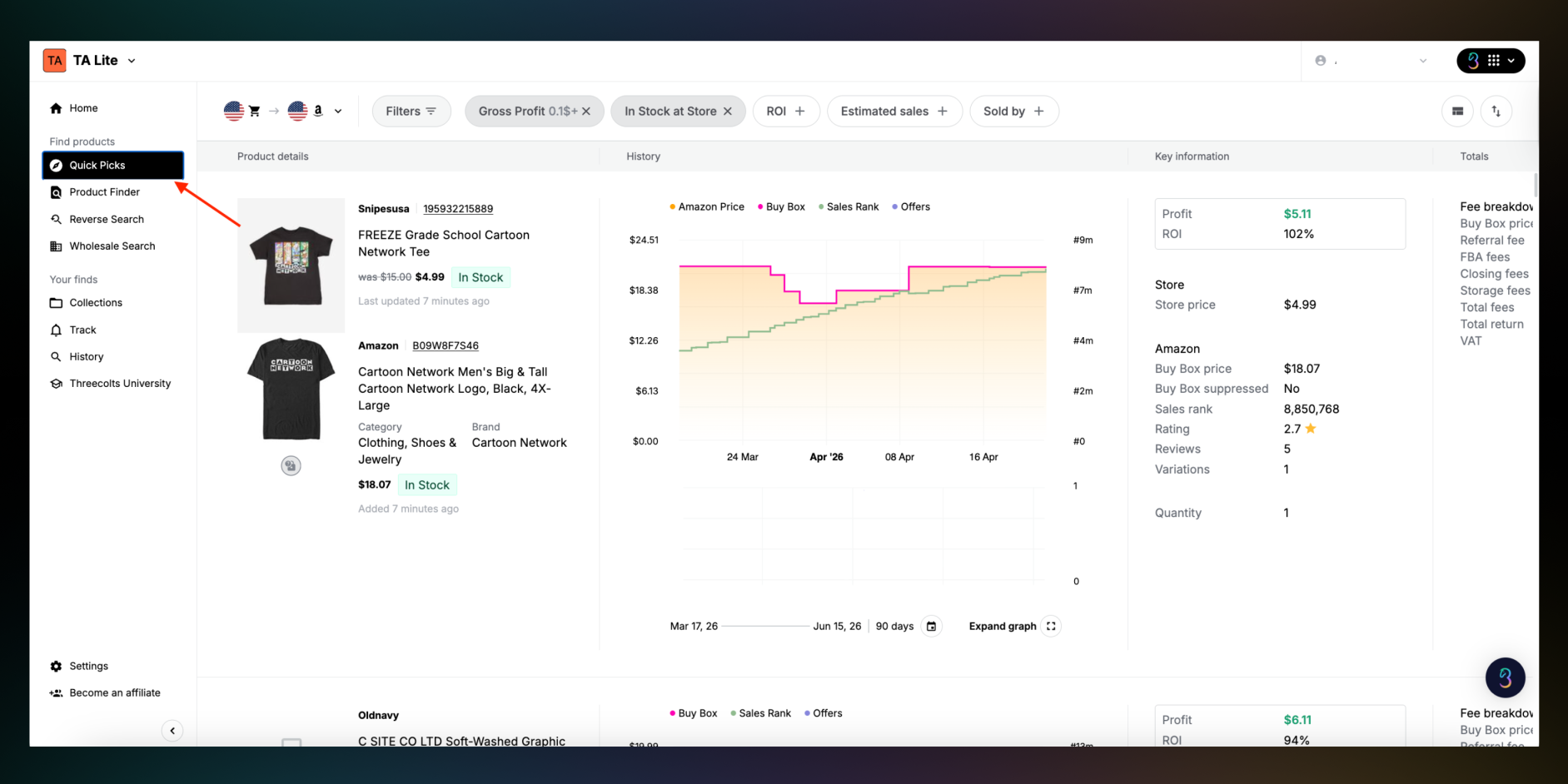
From the Tactical Arbitrage sidebar, click Quick Picks. This feature is available in sync for both TA Lite and TA Classic.
Unlike Product Finder, you don't need to choose a retailer, category, or full scan setup before seeing results. Products are available right away, so you can start reviewing opportunities immediately. This makes Quick Picks helpful when you want to keep sourcing but don't have time to run a full search.
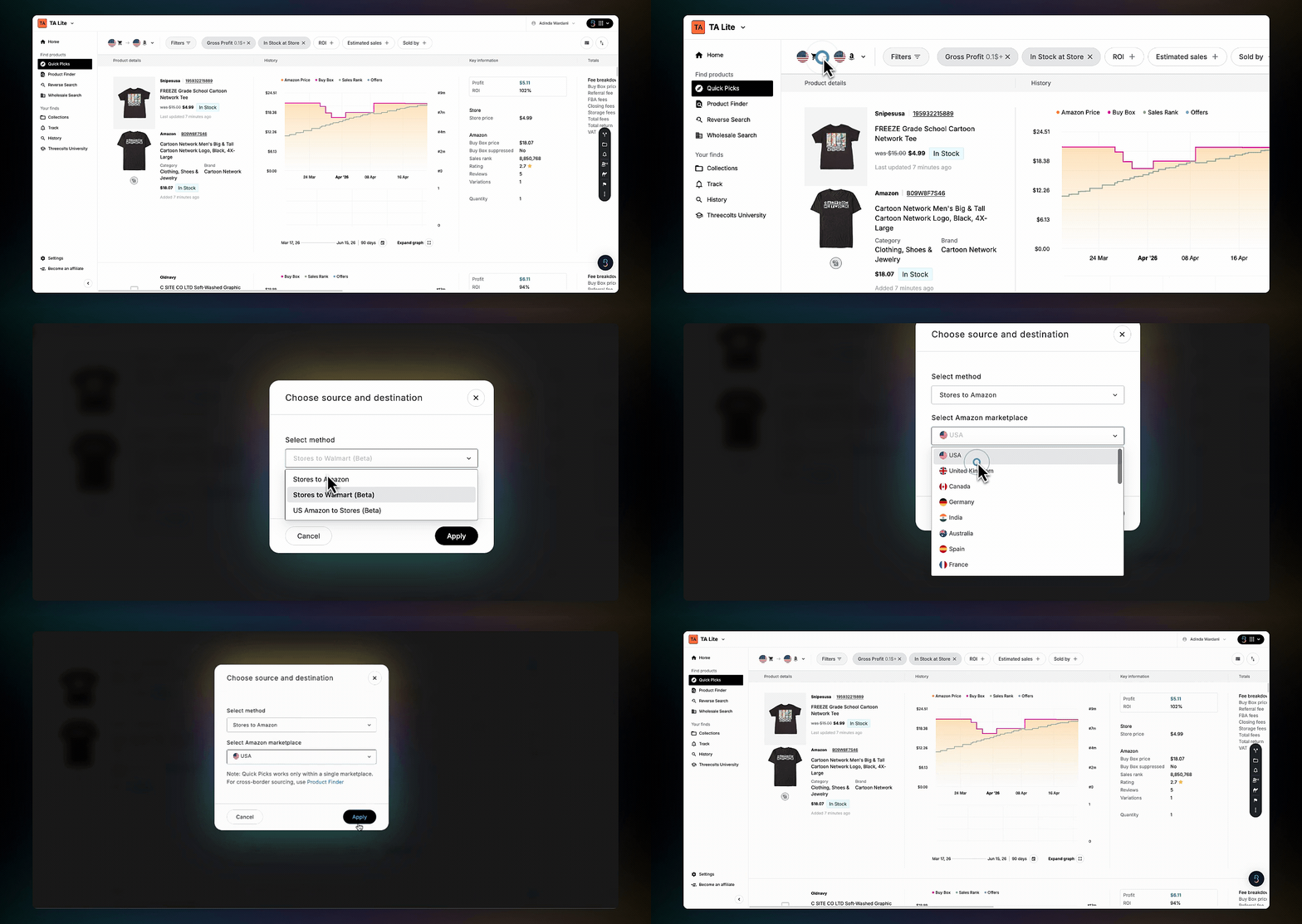
Choose your source and destination
Next, choose where you want to source from and where you want to compare or sell the product. Depending on the options available in your account, Quick Picks may support workflows such as:
Retailer to Amazon
Retailer to Walmart
Amazon to retailer
Choose the option that matches your sourcing strategy. For example, if you're looking for online arbitrage products to resell on Amazon, you'd choose a retailer as your source and Amazon as your selling marketplace. If you need a more advanced setup, broader marketplace research or cross-border sourcing, use Product Finder workflow instead.
Apply filters before reviewing results
Before you start scrolling, apply a few filters. This helps you focus on products that are closer to your buying criteria instead of reviewing every available result manually. Helpful filters include:
Minimum ROI to show products that meet your target return
Added filters to focus on products added within a certain timeframe
Hide Sold by Amazon if you prefer to avoid listings where Amazon is also selling the product
If you're new to Tactical Arbitrage, start with a few core filters instead of making the search too narrow. For example, you might begin with a minimum ROI, a reasonable sales rank range, and Hide Sold by Amazon. This gives you a more focused list without removing too many opportunities too early.
If you see very few results, loosen one filter at a time. Over-filtering is one of the easiest ways to miss products that are still worth reviewing.
Sort the results
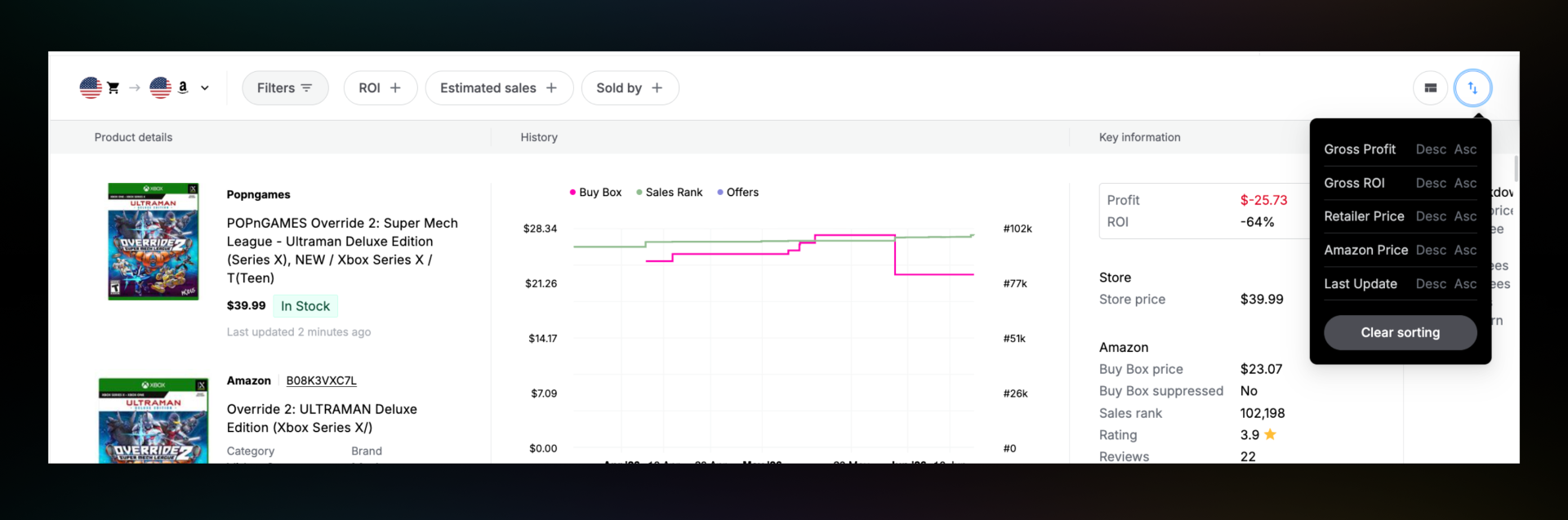
After applying filters, use the Sort By menu to control which products appear first. Common sorting options include:
ROI if you want to prioritize percentage return
Gross Profit if you care more about dollar profit
Last Update if you want to review recently updated opportunities first
For shorter sourcing sessions, Last Update is useful because it brings fresher opportunities closer to the top. If your goal is to find higher-margin products, ROI or Gross Profit will be more useful.
Review the product cards carefully
Each product card gives you a quick comparison between the source product and the marketplace listing. Before focusing on profit, check whether the products actually match. Look at the:
Product image
Title
Brand
For shorter sourcing sessions, Last Update is useful because it brings fresher opportunities closer to the top. If your goal is to find higher-margin products, ROI or Gross Profit will be more useful.
If you’re more of a visual learner, we’ve got you covered! Watch the YouTube video below for a step-by-step walkthrough:
What to check before buying
When a product looks promising in Quick Picks, take a moment to validate it before purchasing.
Quick Picks helps you find the lead. Your validation step helps you decide whether the lead is still accurate and worth acting on. Start with two checks.
1. Check the retailer price
Open the retailer product page and confirm the current price still matches what you saw in Quick Picks.
Retailer prices can change quickly during clearance events, seasonal sales, or limited-time promotions. A product that looked profitable earlier may no longer work if the price increased or the item is now out of stock.
This quick check helps you avoid buying based on outdated pricing.
2. Check the marketplace listing
Next, review the selling side. Look at the Buy Box price, number of FBA sellers, sales rank, reviews, variation match, pack count, and price history.
A product may look profitable at first, but competition, unstable pricing, or a weak product match can reduce the real opportunity.
If the retailer price is valid and the listing looks healthy, move it to your buy list. If it is close but not ready, save it and monitor it.
Pro Tip: Found a promising Quick Picks lead? Save the ASIN and run it through Reverse Search.
This can help you uncover similar products, related brands, competitor storefronts, and more sourcing ideas from one starting point.
Save and validate promising products
Quick Picks works best when you use it to build a short list of products for follow-up.
When you find something interesting, save it to a Collection so you can come back to it later. You can organize Collections based on the next action you need to take, such as:
Buy Now
For products that passed your checks.
Watch
For products that are close but need a better price or better marketplace conditions.
Research More
For products that need deeper validation through Product Finder or Reverse Search.
Add Price Alerts
For products that are close to meeting your criteria, such as price drops, Amazon out-of-stock changes, increased ROI, or other buying signals.
Make Quick Picks part of your sourcing routine
Quick Picks is not about replacing the rest of Tactical Arbitrage. It is about giving you a faster way to find possible opportunities and decide which products deserve deeper research.
A simple routine is to open Quick Picks for five to ten minutes a day, apply your filters, review a small batch of products, and save anything that looks promising.
Over time, that habit can help you keep your deal pipeline active, even on days when you do not have time to run a full scan.
Tactical Arbitrage is included in Seller 365 Reseller, along with tools like InventoryLab, SmartRepricer, FeedbackWhiz, and more. Together, these tools help sellers move from sourcing to listing, pricing, accounting, and customer follow-up in one connected workflow.
Login or create your dedicated Threecolts University accountLogin to start learning
Start learning
or
Create your dedicated Threecolts University account!