What Is UniCon? A Beginner’s Guide
What is UniCon? It is a multichannel commerce platform built for sellers who want to add marketplaces without rebuilding the same catalog by hand.
Adding a second channel sounds straightforward until it asks for different categories, attributes, listing details, inventory updates, and order rules. UniCon helps connect those moving parts around the catalog you already manage.In this guide, you'll learn how UniCon works, what it can manage, what it does not replace, and how to prepare a controlled first launch.
What UniCon Helps You Manage
UniCon is a platform that connects your product catalog and day-to-day marketplace operations in one place. That work covers the full path from product data to the order after it ships.
Channels and Status
See which marketplaces are connected and whether each connection is active.
Catalog and Products
Import the catalog you already use, then choose which products go to each destination.
Categories and Attributes
Match source product data to the categories and fields required by the destination marketplace.
Listings and Status
Publish selected products, then review listing status, warnings, and errors.
Inventory and Pricing
Keep quantities and pricing updates aligned across supported connected channels.
Orders and Fulfillment
Manage supported order, fulfillment, shipment, and tracking workflows from one place.
Connection is not publication. Adding a marketplace creates the relationship, but it does not publish every product or bypass account, category, or product eligibility.
How UniCon Works From Catalog To Marketplace
The exact screens can change, but the beginner workflow stays consistent: connect the source, connect the destination, map the product data, publish selected products, and monitor what happens next.
See how UniCon moves products from catalog to marketplace
Select a step to see what happens and where seller review still matters.
1 Start with what you already manage Connect your source catalog Bring the appropriate product and listing information into UniCon. +
Your source is the marketplace or store where UniCon gets the catalog information it will work from. Amazon, Walmart, and Shopify can serve as source marketplaces.
Authorization lets UniCon bring the appropriate product and listing information into the platform.
2 Choose where you want to expand Connect a destination marketplace Authorize the channel where selected products may be prepared and published. +
Next, connect the marketplace where selected products may be prepared and published. This step starts the relationship between the accounts.
Marketplace approval and product eligibility still apply.
3 Translate the product data Map and review product data Use AI-assisted suggestions, then confirm the matches yourself. +
Each marketplace organizes product information differently. UniCon's AI-assisted mapping suggests where source fields belong in the destination category, such as matching Color to Color family or Brand to Brand.
You review the suggestions, correct anything that does not fit, and complete required information that is missing.
Plain-English version: Two forms may ask for the same information using different labels. UniCon helps put the right answer in the right box, and you confirm the match before publishing.
4 Keep the launch controlled Assign and publish selected products Choose what is ready instead of pushing the whole catalog at once. +
Choose the products you want to send to the destination, review their mapped data, and publish when they are ready.
Keeping connection, mapping, assignment, and publication as separate steps gives you room to test a small product group before expanding further.
5 Stay involved after launch Monitor listings and operations Review status, inventory, pricing, orders, fulfillment, and tracking. +
After publication, review listing status, warnings, errors, inventory, pricing, orders, and tracking.
Supported fulfillment workflows can include seller fulfillment, Amazon Multi-Channel Fulfillment, or Walmart Multichannel Solutions when the inventory, product codes, destination channel, and settings support that flow. Configure fulfillment intentionally and confirm the exact channel combination before relying on it.
Connection is not publication. UniCon does not bypass marketplace approval, product eligibility, or seller review.
Which Marketplaces Does UniCon Support?
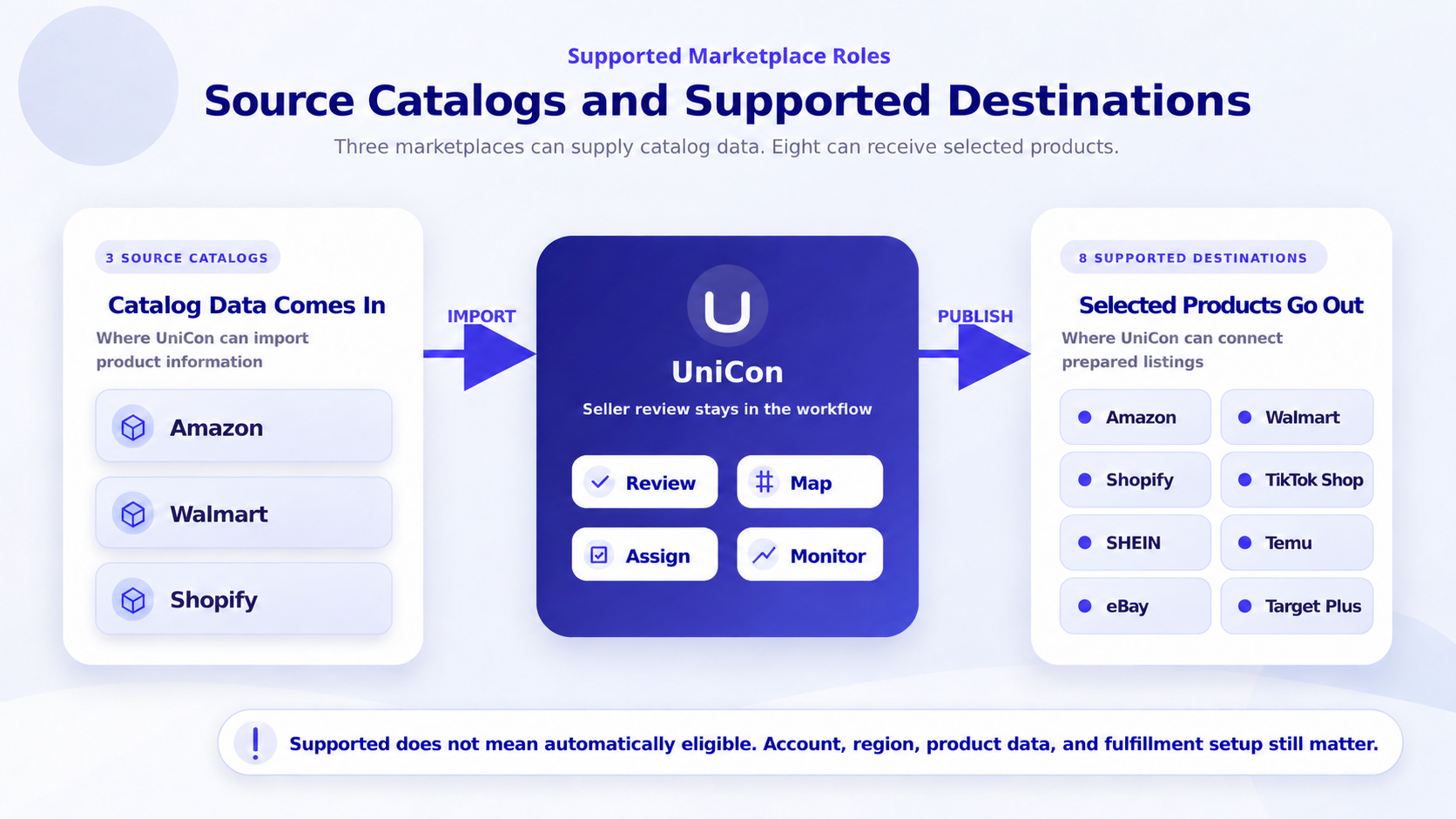
UniCon currently supports eight marketplaces: Amazon, Walmart, Shopify, TikTok Shop, SHEIN, Temu, eBay, and Target Plus. Amazon, Walmart, and Shopify as source marketplaces and all eight as supported destinations.
Prepare For Your First UniCon Launch
Clean source data makes the destination workflow easier to review. Before you connect a new channel, check the information UniCon will use.
Catalog Readiness Check
Expand each area and check the items you have reviewed before mapping or publishing products.
Readiness does not guarantee eligibility. Marketplace, account, category, and product requirements still apply.
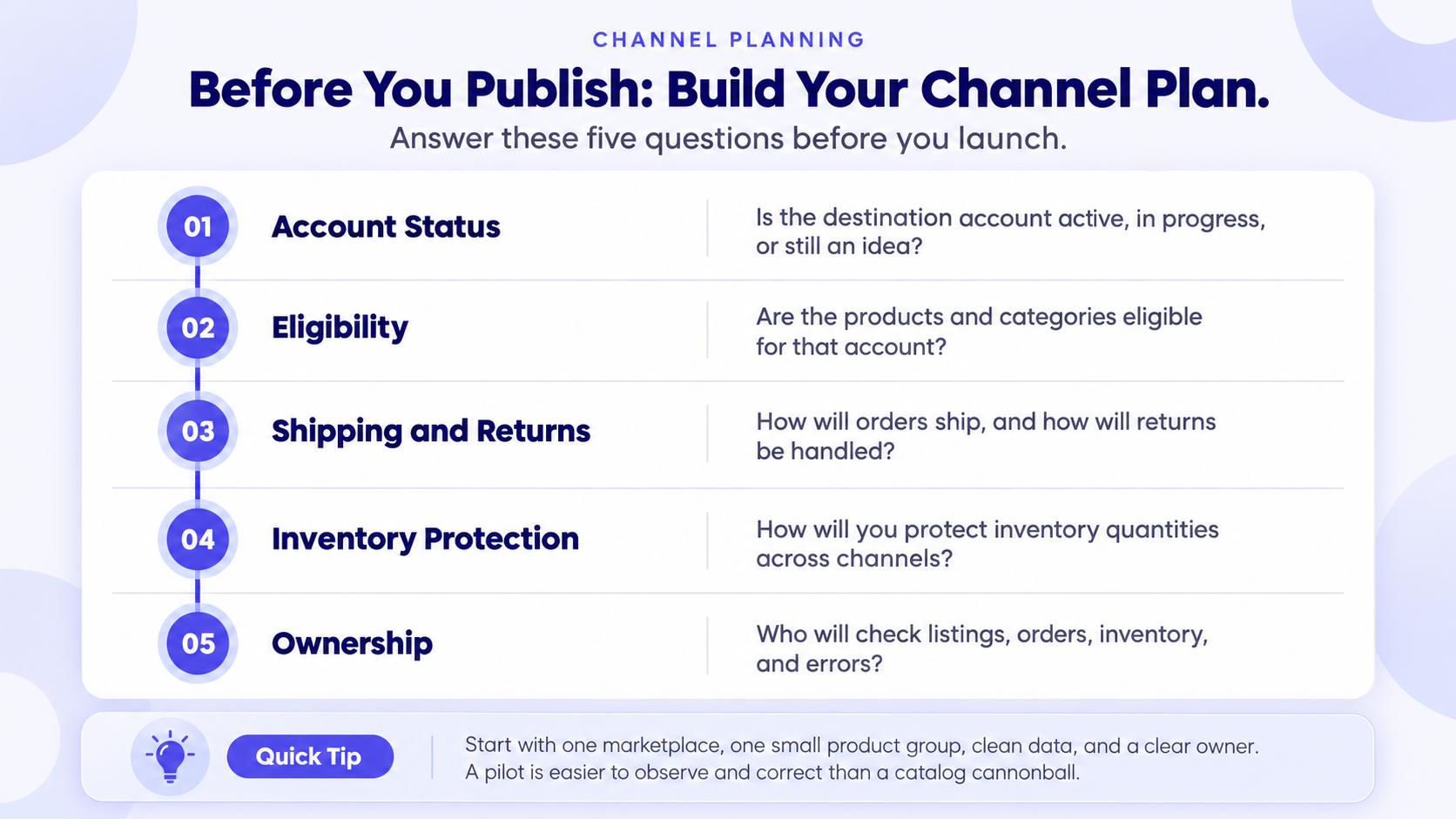
Once your catalog is ready, the next question is whether your channel plan is ready too.
Is UniCon Right For Your Business?
UniCon is most useful when you have both a usable catalog and a real channel plan. It can also help when listings, inventory, pricing, or orders already live in separate places and manual updates are getting harder to track.
-
- You have an established source catalog.
-
- A destination account is active or planned.
-
- Stable SKUs and product data are available.
-
- Someone owns listings, inventory, orders, and exceptions.
-
- You have not selected a destination marketplace.
-
- The source catalog is incomplete or inconsistent.
-
- There is no fulfillment or returns plan.
-
- No one is responsible for monitoring the new channel.
There are several ways to access UniCon. Seller 365 reseller customers can add UniCon without replacing their current reseller workflow, while Seller 365 Brands includes UniCon with brand-focused tools. Dedicated UniCon and enterprise options are also available. Review the current Threecolts pricing and limits before choosing a path because catalog size, order volume, channel count, and the tools you need to keep can change the best fit.
Frequently Asked Questions
Does UniCon publish every product when I connect a marketplace?
No. Connection, mapping, product assignment, publication, and monitoring are separate parts of the workflow. You choose which products to prepare and publish.
Does AI mapping make the final decision?
No. UniCon suggests where source product data belongs in the destination marketplace's fields. You review the matches, correct them when needed, and complete missing required information before publication
Do I need to start with every supported marketplace?
No. Start with one destination and a small product group. Use the first launch to confirm your mapping, inventory, fulfillment, and monitoring process before adding more products or channels.
Does UniCon replace marketplace approval or product eligibility?
No. Your marketplace account, products, and categories must still meet the destination marketplace's requirements. UniCon helps manage the connective work around the catalog and operations.
Can UniCon manage inventory and orders after products are live?
Yes, for supported connected workflows. UniCon can keep inventory and pricing updates aligned, bring orders into a shared view, and return shipment and tracking information to the originating marketplace. The seller still needs to configure fulfillment and monitor exceptions.
Key Takeaways
- UniCon helps manage product data, listings, inventory, pricing, and orders across supported marketplaces.
- Connecting a marketplace does not automatically publish products. Sellers still review mappings, choose products, and control publication.
- Clean identifiers, listing content, catalog structure, and commercial data make launches easier to validate.
- A strong channel plan covers eligibility, fulfillment, returns, inventory protection, and ongoing ownership.
- Start with one marketplace and a small product group, then scale after the workflow is working as expected.
Final Tip
The goal is not to be everywhere tomorrow. Build a workflow you can still control when orders arrive. Start with a clean source catalog, one destination marketplace, one small product group, a clear fulfillment plan, and a named owner.
Related Guides
Explore the UniCon Learning Path
Managing and Expanding Your UniCon Operations
What is UniCon? (In the Seller 365 Help Center)

Policy Pages
Your Q4 just got a raise.
Save on your Seller 365 subscription with our limited-time Black Friday offers. Whether you’re new or already subscribed, there’s a deal for you.
Show me my deal
